
Robotics for Beginners: Learn Robotics from Scratch
This free beginner robotics course teaches you how every robot on earth works — sensors, actuators, and control — using real examples from autonomous vehicles, humanoid robots, and industrial systems. No engineering degree. No coding experience. No hardware required to start.
Home › Robotic Courses › Introduction to Robotics: Learn Robotics from Scratch
TL;DR — Quick Insights
- The sense-decide-act loop: Every robot ever built — from a $25 Arduino car to a Tesla Optimus humanoid — runs on the same three-step architecture. Master this and you understand all of robotics.
- Sensors in plain language: What LiDAR, cameras, IMU, and ultrasonic sensors actually do — with real examples from Moovita‘s autonomous bus fleet and Figure 03’s BMW factory deployment.
- Hardware without fear: Arduino, Raspberry Pi 5, and NVIDIA Jetson Orin explained — what each does, when to use which, and how they connect to sensors and motors.
- Python for robots: The four code concepts (variables, conditions, loops, functions) that power every beginner robot project — with working examples you can run immediately.
- Where this leads: Robotics engineers earned $100K–$380K+ in 2026. After this course you progress directly to Advanced Robotics — ROS 2 Jazzy, SLAM, and sensor fusion.
Course Overview
The Robotics for Beginners course is your entry point into one of the most exciting and fastest-growing engineering fields in the world. Robotics is no longer confined to factory floors. In 2026, robots deliver packages, perform keyhole surgery, explore other planets, drive buses through city traffic, and navigate warehouse shelves autonomously. Understanding how they work is the essential first step to building them.
This course requires nothing from you except curiosity. No maths background. No coding experience. No engineering degree. You will start with the question every beginner has — what actually is a robot? — and finish with a complete understanding of how robots sense, decide, and act, and a clear roadmap for what to learn next.
- Focus: Fundamentals of robotics — hardware, sensors, actuators, programming logic
- Approach: Step-by-step, beginner-friendly, illustrated with real deployed systems
- Outcome: Understand any robot you encounter; confidently start the Advanced course
New to robotics and wondering where this leads career-wise? Read How to Become a Robotics Engineer first for the full roadmap, salary data, and the fastest path for your background.
Who This Course Is For
This course is designed for anyone starting from zero — no exceptions:
- 🎓 Students in engineering, computer science, or any discipline wanting robotics foundations
- 💼 Career changers exploring robotics before committing to advanced study or a bootcamp
- 👩💻 Software engineers who understand code but have never worked with physical hardware systems
- 👨🏫 Educators looking for accurate, up-to-date robotics content to teach or reference
- 🤖 Hobbyists who want to build their first Arduino or Raspberry Pi robot project
- 🔰 Complete beginners — if you can read this page, you can complete this course
Career note: Robotics engineers earned between $100,000 and $380,000 in 2026 depending on specialisation and experience level. See the AI & Robotics Engineer Salary Guide 2026 for a full company-by-company breakdown.
Module 1: Introduction to Robotics
What You’ll Learn;
- What robots are: machines that sense, decide, and act
- The four major robot types: industrial, mobile, humanoid, autonomous vehicles
- Where robots are deployed today: healthcare, logistics, agriculture, automotive, space
- How robots are different from simple automation — the role of intelligence
What Is a Robot?
Robotics is the exciting science and engineering field focused on creating machines that can sense, think, and act. These machines—called robots—are designed to interact with the world around them, make decisions, and perform tasks either automatically or with minimal human guidance. Simply, a robot is a machine that combines three capabilities into a continuous loop:
Robotics is the science of designing machines that combine three capabilities:
1. Sensing — The robot gathers information about its environment through sensors. A camera captures visual data. A LiDAR measures distances. An ultrasonic sensor detects nearby obstacles. An IMU tracks orientation and acceleration. Without sensing, a robot is blind.
2. Deciding — The robot processes sensor data through software and makes a decision: stop, turn, extend the arm, send an alert. This decision-making can range from simple if-then rules to complex neural networks. This is where artificial intelligence enters robotics.
3. Acting — The robot executes its decision through actuators — motors, servos, pneumatics. The actuator translates a software command into physical movement in the world.
This sense-decide-act loop runs continuously — hundreds or thousands of times per second in production systems. Every robot on earth, from a $25 Arduino obstacle-avoider to a $500,000 Figure 03 humanoid operating inside BMW’s Spartanburg plant, runs on this same three-step architecture.
Every robot ever built — from the first hydraulic Unimate arm installed at a General Motors factory in 1961 to the Figure 03 humanoid operating at BMW’s Spartanburg plant today — is built on this same sense-decide-act loop.
The field sits at the intersection of mechanical engineering, electronics, and computer science. What makes robotics distinct from a simple machine (a conveyor belt, a clock) is the combination of sensing, computation, and actuation that allows a robot to respond adaptively to its environment.
Why Learn Robotics in 2026?
Three forces are making robotics the most important engineering skill of the decade:
- The humanoid robot deployment wave is here. In 2025, approximately 16,000 humanoid robots were operating commercially worldwide. By end of 2026, that number is expected to exceed 50,000. Figure 03 is assembling vehicles at BMW. Tesla Optimus is handling parts inside the Fremont factory. Unitree G1 robots are performing inspection tasks at manufacturing facilities across Asia. The engineering talent required to build, deploy, and maintain these systems does not yet exist at scale — creating enormous demand for engineers who understand robotic fundamentals.
- The global robotics market is accelerating. The market is projected to exceed $218 billion by 2030, growing at 26% per year. Every major technology company — NVIDIA, Google DeepMind, Amazon Robotics, Apple, Meta — has a major robotics programme. NVIDIA’s Isaac Lab and GR00T N1.5 are changing how robots learn. The Physical AI revolution is beginning.
- You can start without hardware. Modern simulation tools — NVIDIA Isaac Sim, Gazebo, and Webots — let you build and test complete robot systems on a standard laptop. You can complete this entire beginner course and the Advanced course without owning a single physical component.
The Four Major Robot Types
Robotics is a vast field, and robots come in many forms depending on their purpose. This image above illustrates four major categories of robots: industrial robots, mobile robots, humanoid robots, and autonomous vehicles, explained in simple yet expert terms with examples
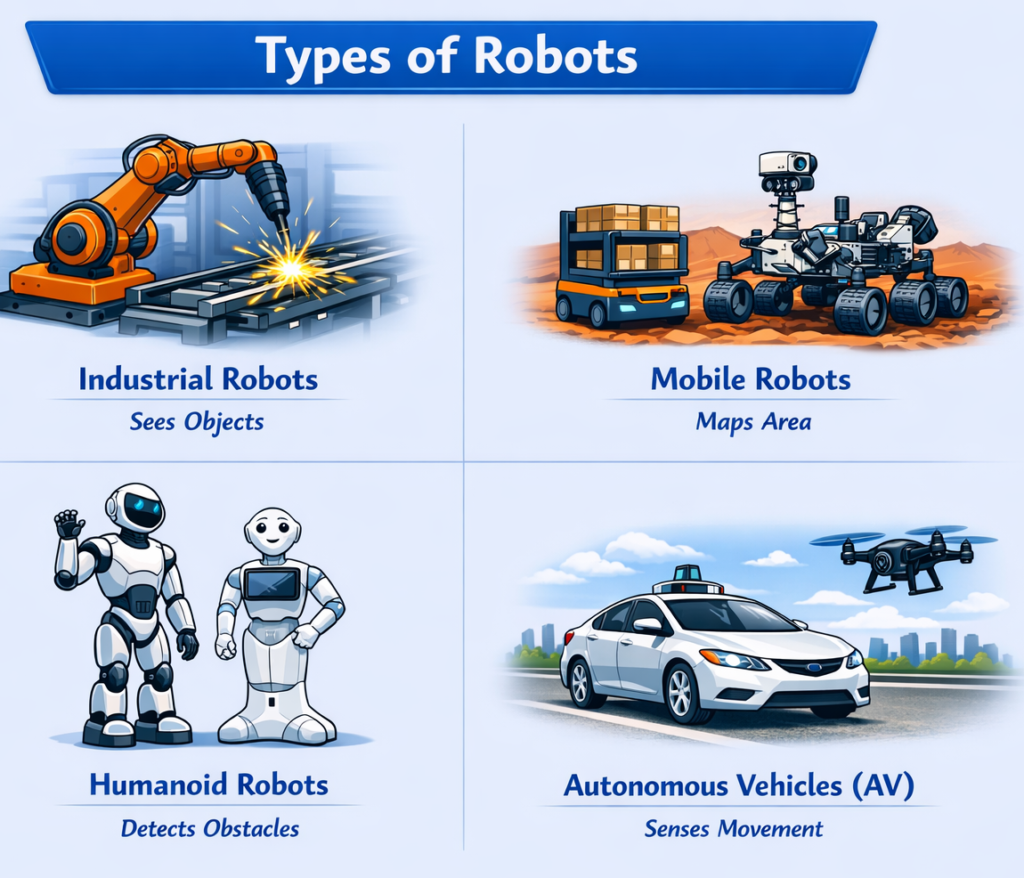
- Industrial Robots are fixed-base machines designed for precision, repetitive tasks in structured environments. Welding robots join car chassis with sub-millimetre precision. Assembly robots place components onto circuit boards thousands of times per hour. These robots operate in fully known, controlled environments — every object is where the robot expects it to be.
- Mobile Robots can move through their environment. They navigate using maps, sensors, and path-planning algorithms. Amazon’s Kiva warehouse robots, hospital delivery robots, and agricultural field scouts are all mobile robots. Dr. Limbu’s team at Moovita built Singapore’s first autonomous bus fleet — a mobile robot system operating on live public roads with unpredictable pedestrians, cyclists, and weather.
- Autonomous Vehicles are mobile robots built for road transport — the most complex, unpredictable environment any robot has operated in. Waymo is running fully driverless rides in San Francisco, Phoenix, and Austin. Moovita’s Level 4 AV software operates buses on public roads in Singapore, Malaysia, and China. See Waymo vs Tesla FSD: The Truth in 2026 for the full technical comparison.
One of the most important real-world robotics problems beginners should understand: GPS does not work inside tunnels, underground carparks, or dense urban canyons (tall buildings on both sides). When GPS fails, an autonomous vehicle must navigate using only its onboard sensors — LiDAR, cameras, and IMU — using a technique called dead-reckoning.
Position error grows every second without GPS correction. Read the full breakdown: Why Self-Driving Cars Go Blind in Cities (and How They Fix It). Then try the free GPS-Denied Drift Estimator calculator to see exactly how much position error your robot would accumulate over time. - Humanoid Robots use the same bipedal form as humans to operate in environments designed for people — climbing stairs, opening doors, using existing tools. In 2026, Figure 03 operates at BMW Spartanburg, Tesla Optimus works inside the Fremont factory, and Boston Dynamics Atlas is in active trials at Hyundai.
| Robot | Company | Deployment 2026 | Key capability |
|---|---|---|---|
| Figure 03 | Figure AI | BMW Spartanburg factory | VLA-based dexterous manipulation |
| Tesla Optimus Gen 3 | Tesla | Fremont + Gigafactories | End-to-end neural policy control |
| Boston Dynamics Atlas | Hyundai / BD | Hyundai manufacturing trials | Whole-body motion control |
| Unitree G1 | Unitree Robotics | Asia-Pacific industrial sites | Cost-effective general mobility |
For a full technical comparison, read UDHY’s Humanoid Robots 2026: Figure, Atlas, Optimus & Unitree.
Module 2: Electronics & Hardware Basics
What You’ll Learn;
- Sensors: cameras, LiDAR, ultrasonic, IMU — how robots perceive the world
- Actuators: DC motors, servo motors, robotic arms — how robots move
- Microcontrollers: Arduino and Raspberry Pi as the robot’s brain
- How sensors and actuators connect and communicate
Understanding a robot’s hardware is as important as understanding its software. Every robot is a physical system first — software alone cannot move a wheel, extend a gripper, or read the temperature of a surface.
Sensors — How Robots Perceive the World
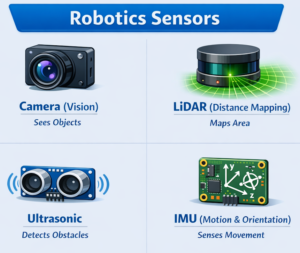
Sensors are a robot’s connection to physical reality. Without sensors, a robot is completely blind. Different sensors serve different perceptual purposes — and in production systems, multiple sensors are combined to overcome each other’s weaknesses. This is called sensor fusion.
| Sensor | What it measures | Best for | Weakness |
|---|---|---|---|
| RGB Camera | Colour images at 30–120 fps | Object detection, lane marking, faces | No direct depth, fails in low light |
| LiDAR | Precise 3D distance via laser | 3D mapping, AV obstacle detection | Expensive, struggles in heavy rain |
| Ultrasonic | Short-range distance via sound | Parking sensors, close obstacle avoidance | Short range only (2–4m), narrow beam |
| IMU | Acceleration and angular velocity | Balance control, orientation, dead-reckoning | Drift accumulates over time without GPS |
| Wheel Encoder | Wheel rotation count (distance) | Odometry, speed control, path tracking | Slippage causes error accumulation |
| Force/Torque | Contact force at end-effector | Delicate grasping, assembly verification | Expensive, requires careful calibration |
Sensor fusion in practice: In Moovita’s autonomous buses, 12+ sensor types operated simultaneously — 6 LiDAR units, 6 cameras, 4 radar units, and a GPS/IMU fusion system. Each sensor’s strengths compensated for another’s weaknesses. When rain degraded the LiDAR returns, radar and camera data carried more weight. When GPS was unavailable in a tunnel, the IMU and wheel encoders maintained position. To understand exactly how sensor uncertainty combines in a fused system, use UDHY’s free Sensor Fusion Uncertainty Calculator.
Sensor fusion is covered in depth in the Advanced Robotics course. The 6 Ways Sensor Fusion Fails in Self-Driving Cars blog post is also essential reading before you start the Advanced course.
Actuators — How Robots Move
Actuators convert electrical signals into physical movement. They are the robot’s muscles.
- DC Motors spin continuously. Speed is controlled by varying voltage or using PWM (Pulse Width Modulation) signals. A simple obstacle-avoiding robot uses two DC motors — one per wheel. Speed difference between the two wheels creates turning. Estimate your wheel odometry accuracy with the free Wheel Odometry Calculator.
- Servo Motors rotate to a specific angle and hold it precisely. They are the standard actuator for robotic arms and grippers. A servo motor in a robotic arm holds a 2kg payload at a precise 45-degree angle indefinitely. Figure 03’s hand actuators use servo-like mechanisms to grip BMW assembly components without damaging them.
- Stepper Motors rotate in precise incremental steps. Used in 3D printers, CNC machines, and camera gimbal systems where exact positioning is critical without feedback sensors.
- Linear Actuators produce straight-line push or pull force. Used in legged robot hip joints, wheelchair lift systems, and industrial press mechanisms.
Microcontrollers — Three Levels for Three Use Cases
Choosing the right computing platform is one of the most important beginner decisions in robotics. Three platforms cover 95% of all robotics projects:
Arduino Uno R4
~SGD 30 · Beginner
Reads sensors, controls motors, runs C++ code. Perfect for first robot projects — obstacle avoiders, line followers, robotic arms. Updated R4 WiFi version adds wireless connectivity.
Best for: first robot project
Raspberry Pi 5
~SGD 75 · Intermediate
Full Linux computer with 4-core ARM CPU and 8GB RAM option. Runs Python, connects to WiFi, processes camera images with OpenCV, runs ROS 2. The 2024 Pi 5 is 2–3× faster than Pi 4 — it can handle real-time camera-based navigation.
Best for: camera + ROS 2 projects
NVIDIA Jetson Orin
~SGD 500+ · Advanced
GPU-accelerated AI inference at the edge. Runs deep learning models, VLA inference, multi-camera BEV fusion, and ROS 2 simultaneously. Moovita’s autonomous buses used Jetson for their perception pipelines. Covered in depth in the Expert Robotics course.
Best for: Physical AI deployment
🛒 Recommended hardware for this course: You don’t need any hardware to complete this beginner course. When you are ready to build, visit the UDHY Robotics Store for Dr. Limbu’s curated kit recommendations for each level.
Module 3: Programming for Robotics
What You’ll Learn;
- Python basics: variables, conditions, loops, and functions for robot control
- C++ essentials: real-time control and performance-critical applications
- Logic building: decision trees and behaviour programming
- Your first robot program: a simulated motor controller in Python
Why Python First — and When to Switch to C++
Python dominates robotics development in 2026 for one reason: speed of learning. Python’s readable syntax lets you focus on the robotics logic rather than language mechanics. It powers ROS 2 (the industry-standard robotics middleware), PyTorch and TensorFlow (deep learning), OpenCV (computer vision), and NVIDIA Isaac Sim (simulation).
C++ is used when performance is critical — real-time sensor drivers, hardware communication protocols, and production-grade ROS 2 nodes. A rule of thumb from production AV development: prototype in Python, deploy in C++. The Advanced Robotics course introduces C++ ROS 2 nodes.
The 4 Python Concepts Every Beginner Needs
Variables store sensor readings, motor speeds, and decision states:
# Sensor readings
distance_cm = 45.2          # ultrasonic sensor (cm)
heading_deg = 90.0          # IMU compass heading (degrees)
battery_pct = 87            # battery level (%)

# Robot state
motor_speed = 150           # PWM value 0-255
is_stopped = False          # movement flag
task = "navigate_to_goal"   # current mission
Conditions implement decision logic:
SAFE_DISTANCE_CM = 25   # minimum safe distance to obstacle

if distance_cm < SAFE_DISTANCE_CM:
    is_stopped = True
    motor_speed = 0
    print(f"Obstacle at {distance_cm:.1f}cm — stopping")
elif distance_cm < SAFE_DISTANCE_CM * 2:
    motor_speed = 75    # slow down when approaching
    print("Approaching obstacle — slowing")
else:
    motor_speed = 200   # full speed — path is clear
    print("Path clear — full speed")
Loops keep the robot running continuously:
import time

# Main control loop — runs until manually stopped
# In production AV systems this runs at 10-100 Hz
loop_count = 0

while True:
    # 1. Read sensors
    distance_cm = read_ultrasonic()
    heading_deg = read_imu()
    battery_pct = read_battery()

    # 2. Safety check — always first
    if battery_pct < 10:
        emergency_stop()
        print("Low battery — emergency stop")
        break

    # 3. Make decision
    if distance_cm < SAFE_DISTANCE_CM:
        stop_motors()
    else:
        set_motors(speed=150, heading=heading_deg)

    # 4. Log and wait
    loop_count += 1
    print(f"Loop {loop_count}: dist={distance_cm:.1f}cm, hdg={heading_deg:.0f}°")
    time.sleep(0.01)  # 100 Hz loop = 10ms per cycle
Functions organise robot behaviour into reusable blocks:
def check_obstacle(threshold_cm: float = 25.0) -> bool:
    """Returns True if an obstacle is within the safety threshold."""
    distance = read_ultrasonic()
    return distance < threshold_cm

def navigate_forward(speed: int = 150) -> None:
    """Drive forward at the given speed."""
    set_left_motor(speed)
    set_right_motor(speed)

def turn_right(degrees: float = 45.0) -> None:
    """Turn right by the given angle using IMU feedback."""
    target_heading = (read_imu() + degrees) % 360
    while abs(read_imu() - target_heading) > 2.0:
        set_left_motor(150)
        set_right_motor(-150)  # right turn: opposite wheel direction

def obstacle_avoidance_loop() -> None:
    """Complete autonomous obstacle avoidance behaviour."""
    print("Starting obstacle avoidance...")
    while True:
        if check_obstacle(threshold_cm=25.0):
            stop_motors()
            turn_right(degrees=45.0)
        else:
            navigate_forward(speed=150)
        time.sleep(0.01)

# Run the robot
obstacle_avoidance_loop()
Introduction to ROS 2 — What Comes Next
Once you understand the four Python concepts above, you are ready to learn ROS 2 (Robot Operating System 2) — the industry-standard middleware that connects all the components of a real robot into one unified system. ROS 2 Jazzy Jalisco (the current LTS release) is used by Moovita’s engineers, NASA’s rover teams, Boston Dynamics, and virtually every professional robotics team in the world.
In ROS 2, each robot function becomes a separate node — a sensor reader node, a decision-making node, a motor controller node — and they all communicate by publishing and subscribing to topics. The architecture is exactly the sense-decide-act loop you learned in Module 1, implemented as a distributed software system.
The full ROS 2 tutorial is in the Advanced Robotics course. For a quick introduction, read ROS 2 Jazzy Tutorial for Beginners 2026.
Simulation: Build Robots Without Hardware
You do not need to own hardware to start robotics in 2026. Modern simulators are photorealistic, physics-accurate, and free:
- Webots — The most beginner-friendly simulator. Runs in browser, requires no GPU, perfect for this beginner course’s Python examples.
- NVIDIA Isaac Sim — The most advanced robotics simulator in 2026. Photorealistic rendering, real-time physics, direct integration with ROS 2 and Python. Free for research and education. Runs on any NVIDIA GPU. Used for training the neural networks that control Figure 03 and Atlas.
- Gazebo (Harmonic) — The open-source standard, fully integrated with ROS 2. Lower hardware requirements than Isaac Sim. Excellent for learning ROS 2 architecture and testing navigation algorithms.
Career Paths From This Course
Robotics is a gateway to multiple high-paying engineering careers. After completing the full UDHY curriculum (Beginner → Advanced → Expert), these are the roles you are preparing for:
| Career Path | Starting Salary (US) | Senior Salary (US) | Key Skills |
|---|---|---|---|
| Robotics Engineer | $100K–$145K | $185K–$280K | ROS 2, kinematics, C++, sensor fusion |
| Autonomous Vehicle Engineer | $130K–$180K | $200K–$300K | Perception, SLAM, safety engineering |
| AI/ML Robotics Engineer | $145K–$210K | $240K–$380K | Deep learning, VLA models, Python |
| Physical AI Specialist | $185K–$280K | $300K–$500K+ | Foundation models, sim-to-real, Isaac Lab |
Source: UDHY AI & Robotics Engineer Salary Guide 2026
Free Engineering Tools — Use These Now
UDHY’s 13 free engineering calculators are built from real AV deployment experience. These are the tools Moovita’s engineers used when designing the sensor systems for Singapore’s autonomous bus fleet. Use them alongside this course — they make abstract concepts tangible.
🔧 FREE ENGINEERING CALCULATORS
6 featured tools below · Browse all 13 free calculators →
AV Safety Distance Calculator
Minimum safe following distance combining system latency, braking differential, and perception uncertainty.
Safety · Top PriorityAV Stopping Distance Calculator
Total stopping distance including latency travel and braking — sets your minimum required sensor detection range.
Braking · Sensor RangeLiDAR Point Cloud Density Calculator
Points per m² at any range using real beam count and firing rate — for sensor selection and ODD specification.
LiDAR · ODD SpecCamera FOV Calculator
Horizontal, vertical, and diagonal FOV from sensor dimensions and focal length — plus ground coverage at any detection range.
Camera · Lens SelectionRobotics combines mechanical design, electronics, and computer programming to create intelligent machines. By learning robotics, beginners gain skills that are valuable in technology, engineering, and problem-solving—making it one of the most exciting fields to explore today.
📢 Notice: Learn the Basic & Explore Self-Driving Cars
🚘 New to autonomous vehicles? Start with our beginner-friendly guide:
👉 Click here to read our full beginner-friendly guide: Self-Driving Cars Explained
Robotics Real-World Applications
Robotics is no longer limited to laboratories—it is actively transforming industries and everyday life. Here’s how robotics is applied in key sectors, explained in expert yet beginner-friendly terms with real examples:
- Healthcare
Robotics is revolutionizing healthcare by assisting doctors and improving patient outcomes. Surgical robots, such as the da Vinci Surgical System, allow surgeons to perform delicate operations with extreme precision. These robots reduce recovery times and minimize risks. Beyond surgery, robots deliver medications in hospitals, assist in rehabilitation, and support elderly care with mobility and monitoring. - Logistics
In logistics, robotics ensures speed and efficiency. At Amazon warehouses, fleets of mobile robots transport shelves of products directly to human workers, reducing walking time and speeding up order fulfillment. Autonomous delivery robots are also being tested to bring packages straight to customers’ doors, making logistics smarter and faster. - Agriculture
Farming is becoming smarter with robotics. Autonomous tractors can plow fields, plant seeds, and harvest crops with minimal human intervention. Drones monitor crop health from above, while robotic harvesters pick fruits and vegetables. These technologies help farmers increase yields, reduce labor costs, and manage large farms more effectively. - Automotive
The automotive industry is at the forefront of robotics innovation. Self-driving systems use sensors, cameras, and AI to navigate roads safely without human drivers. Companies like Tesla and Waymo are developing autonomous cars that promise to reduce accidents and improve traffic flow. In factories, robots also assemble vehicles with speed and precision, ensuring consistent quality.
[ Go to Top ]
💡 Insight: Robotics is actively shaping healthcare, logistics, agriculture, and automotive industries. From saving lives in operating rooms to delivering packages, growing food, and driving cars, robots are becoming essential partners in modern life.
FAQs on Robotics
UDHY Handpicked Robotics Toolkits
| Component | Description | Resource Link |
| Arduino Uno R4 Minima, Smart IoT & Basic Sensor Projects with Online Tutorials | SunFounder Ultimate Sensor Kit with Original Arduino Uno R4 Minima, Smart IoT & Basic Sensor Projects with Online Tutorials(Original Arduino Uno R4 Minima Included) | View Product Specs |
| CanaKit Raspberry Pi 5 Starter Kit | CanaKit Raspberry Pi 5 Starter Kit – Turbine Black (128GB Edition) (8GB RAM) | View Product Specs |
| stm32 discovery | Waveshare STM32F4DISCOVERY STM32 Discovery Kit for STM32 F4 series7 32-bit ARM Cortex-M4F Core 1 MB Flash 192 KB RAM STM32F4 Discovery Board | View Product Specs |
Ready to transition from basic electronic microcontrollers into 3D coordinate frames and autonomous middleware architectures? Graduate to our [Advanced Robotics and ROS 2 Curriculum].
Buy Robotics Kits for Beginners 🛒
Ready to start building your first robot? Visit UDHY’s Robotics Online Store to explore beginner‑friendly robotics kits designed for learning sensors, motors, and coding. Each kit includes everything you need to build, test, and understand real robots—perfect for students, hobbyists, and future innovators.
Curious about how these skills fit into real career tracks? See our full guide on How to Become a Robotics Engineer.
For a deeper dive into how robots combine perception, reasoning, and action, see our guide on What Is Physical AI? Explained.
💡 Running the AI track in parallel?
This course pairs perfectly with Deep Learning for Robotics — Module 5 here (Perception) directly complements that course’s CNN and YOLO content. Running both simultaneously gives you the complete picture: the AI side and the robotics engineering side of the same perception pipeline.
Read alongside this course:
- Sensor Fusion Explained: Cameras, LiDAR & Radar — the multi-sensor stack this course implements
- Why Self-Driving Cars Still Fail — the real-world perception challenges your YOLO model must overcome
- The Complete Guide to AV Teleoperation — human-in-the-loop control that pairs with your ROS 2 learning
- How to Choose the Right LiDAR — hardware guide for the point cloud work in Module 5
Designed by Dr. Dilip Kumar Limbu — Former Principal Research Scientist, A*STAR · Co-Founder, Moovita, Singapore’s first autonomous vehicle company · 30 years building real-world autonomous systems. UDHY.com.
